AI Smile Simulator for dental practices
Let patients see their new smile, then enquire with your practice
The DenBrain AI Smile Simulator turns website visitors' interest in their smile into patient enquiries and appointment requests. Visitors see an illustrative AI-generated smile beside their own photo, and the enquiry goes straight to your team.
- 30-day free trial
- No payment card needed to start
- Guided setup checklist
AI Smile Simulator
Drag to compare


Illustrative example using AI-generated images, not a real patient.
Why practices use DenBrain
UK-first and privacy-led
UK company, a published privacy notice, a data processing agreement and a subprocessor list.
Temporary images
Generated AI Smile Simulator images are temporary: they are removed after 24 hours unless your practice deliberately saves them.
You control the options
Patients only see the treatments, wording and prices your practice has enabled.
No overclaiming
Every preview is labelled as illustrative: not a diagnosis, clinical prediction or guarantee.
Features
Everything between a website visit and a booked conversation
AI Smile Simulator
Visitors choose a treatment, answer a few questions and add a photo to see an AI-generated visualisation beside their own picture. Illustrative only, never a prediction.
Patient enquiry capture
Every AI Smile Simulator can become an enquiry with the visitor's details, the treatment they were interested in and where they came from.
Enquiry CRM
Eight enquiry stages, notes, assignment, search, filters, saved views and CSV export. Custom properties are available on Complete and Pro.
Analytics and reporting
Six reports covering the enquiry funnel, sources, treatments and volume, with date filters and CSV download. Conversion-by-source and appointment reports are in Complete and Pro.
Set up for your practice
Choose which of the eight AI Smile Simulator treatments to offer (plus a 'something else' option), add your own price and duration wording if you wish, and match your logo and colours.
Integrations
Use your own online-booking link and phone number, and add AI Smile Simulator with a one-line website embed.
How it works
Three steps from setup to enquiries
Step 1: Configure DenBrain for your practice
Add your logo and colours, choose the AI Smile Simulator treatments to offer, add your booking link and phone number.
Step 2: Add it to your website
Copy one embed snippet from your dashboard onto the pages you choose. The widget only loads on the website addresses you have allowed.
Step 3: Engage visitors and manage enquiries
Visitors try the AI Smile Simulator. Their enquiries appear in your CRM, where your team follows them up and reviews the reports.
AI Smile Simulator
Let visitors picture the conversation, not promise the result
- Treatment-specific questions, so a whitening visitor is asked about shade, not alignment.
- Camera or photo upload; your visitor's own photo keeps its original shape and orientation.
- Drag, tap or use the keyboard to compare, and open it full screen.
- Book Appointment and Call buttons use your own booking link and phone number.
The information button beside the image explains that previews are illustrative only.
Example only: AI-generated demonstration images, not a patient or a customer, and not a clinical prediction.
For whom
Built for the way dental practices work
Independent practices
Give your website a patient-friendly way to explore treatments and make an enquiry outside opening hours, with your own wording and branding.
Multi-site clinics
Run a separate widget configuration for each practice, with enquiries and reports kept per practice.
Specialist practices
Offer only the treatments that fit your practice, and keep suggestions limited to the options you have enabled.
Practice managers
See new enquiries in one place, move them through stages, add notes and export what you need.
The product
A dashboard your whole team can use
Screens from the live product, shown with example data (no real patients).
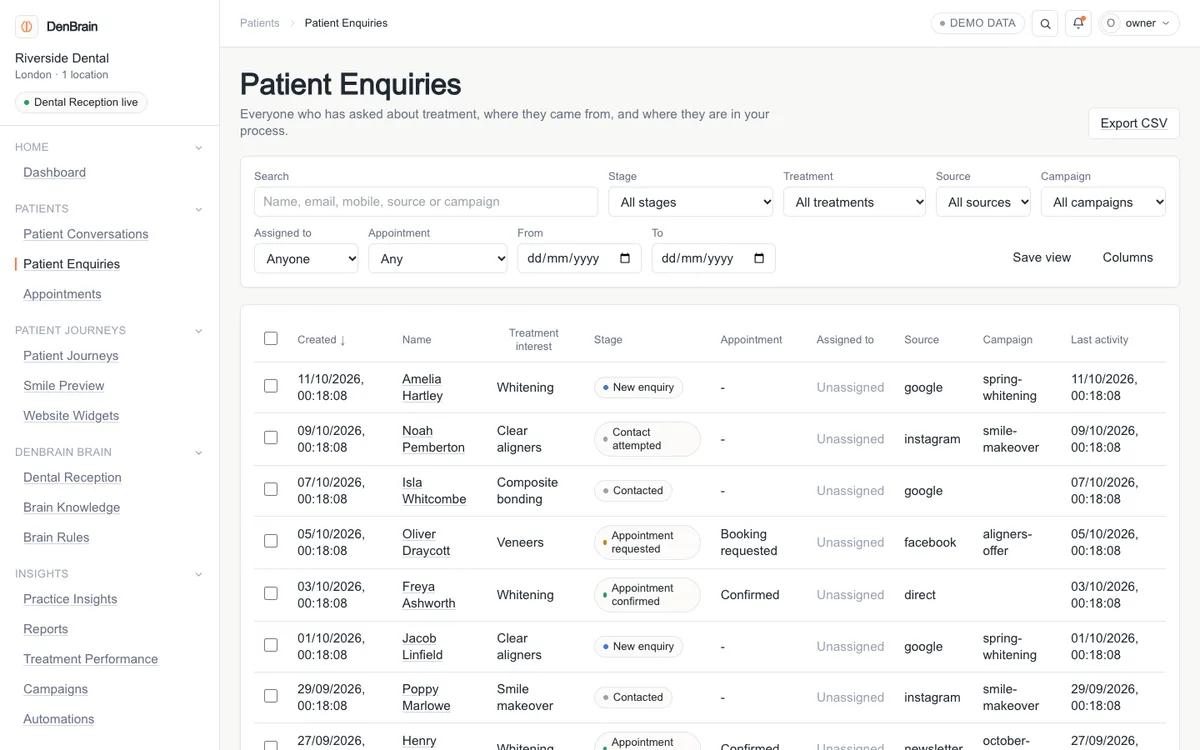
Enquiry CRM
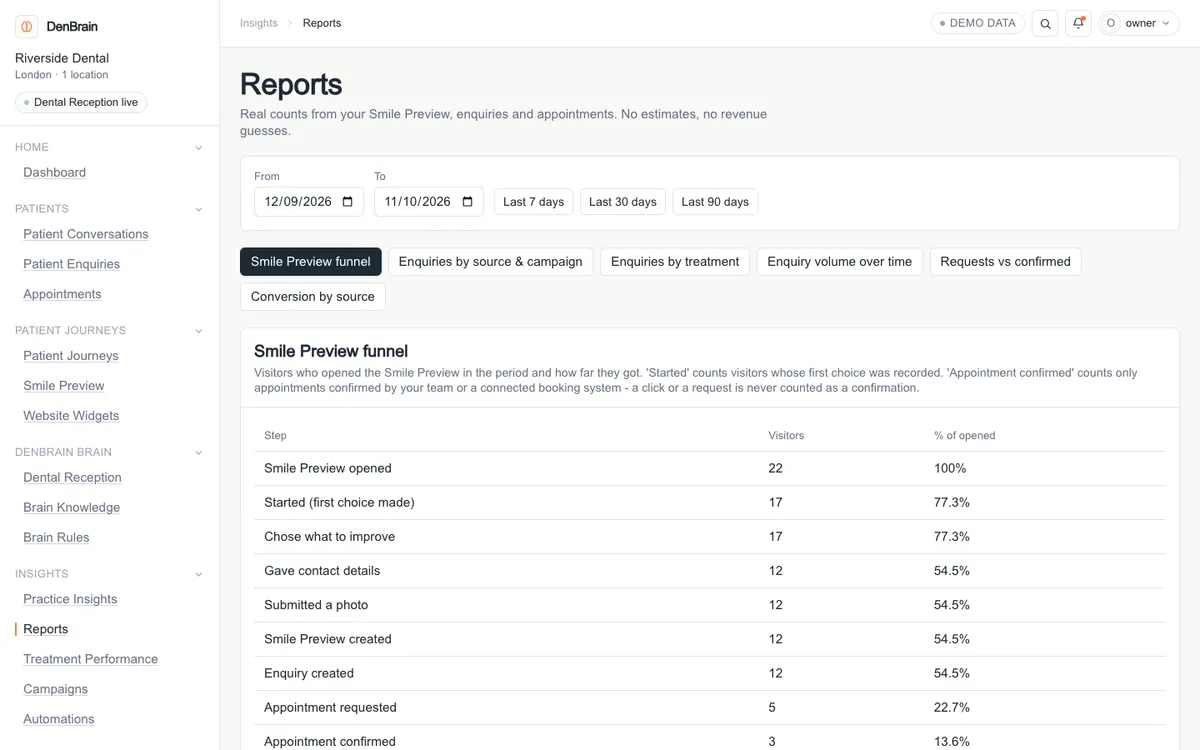
Reports
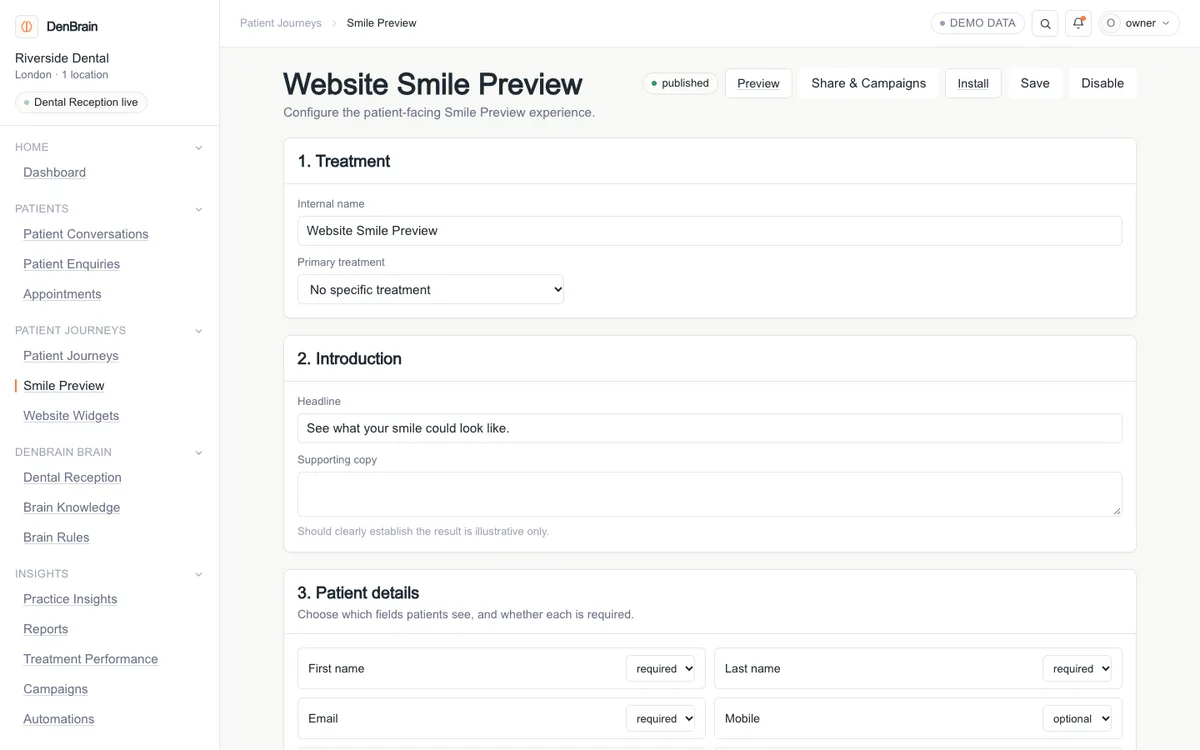
AI Smile Simulator settings
Pricing
Simple plans that grow with your practice
Every plan includes AI Smile Simulator and the enquiry CRM. Plans differ in monthly AI Smile Simulator generations and in the Complete and Pro extras.
Pay month to month. Switch to annual billing for one month free.
Smile Preview
£49/month
Billed monthly
50 AI Smile Simulator generations each month
- AI Smile Simulator on your website
- Enquiry CRM, CSV export and core reports
- Advanced reports and custom CRM properties are in Complete and Pro
Buy now with secure Stripe checkout, or try free for 30 days first. No card needed for the trial.
Complete
£99/month
Billed monthly
100 AI Smile Simulator generations each month
- AI Smile Simulator on your website
- Enquiry CRM, CSV export and core reports
- Advanced reports and custom CRM properties
Buy now with secure Stripe checkout, or try free for 30 days first. No card needed for the trial.
Pro
£299/month
Billed monthly
500 AI Smile Simulator generations each month
- AI Smile Simulator on your website
- Enquiry CRM, CSV export and core reports
- Advanced reports and custom CRM properties
Buy now with secure Stripe checkout, or try free for 30 days first. No card needed for the trial.
Every account starts with a 30-day free trial including 10 AI Smile Simulator generations. No payment card is needed to start.
| What is included | Smile Preview | Complete | Pro |
|---|---|---|---|
| AI Smile Simulator generations each monthCounted when a preview is successfully created. Failed attempts are not counted. | 50 | 100 | 500 |
| AI Smile Simulator with your approved treatments | Included | Included | Included |
| Enquiry CRM: stages, notes, assignment, saved views | Included | Included | Included |
| CSV export of your enquiries | Included | Included | Included |
| Core reports: funnel, sources, treatments, volume | Included | Included | Included |
| Advanced reports: conversion by source, appointments | Not included | Included | Included |
| Custom CRM properties | Not included | Included | Included |
Prices are in GBP. Promotion codes, where valid, are applied at checkout.
Book a demo
See DenBrain with your team
Tell us a little about your practice and we'll reply by email to arrange a walkthrough. Prefer to try it yourself? Start the free trial, no payment card needed.
FAQ
Questions practices ask us
How does AI Smile Simulator work?
Can we choose which treatments appear?
How do we add it to our website?
How does the 30-day free trial work?
How does billing work, and can I cancel?
What happens to patient photos?
Which integrations are available?
Is an AI Smile Simulator a diagnosis or a promise of results?
How do I get support?
Give your dental practice an AI brain
Start your 30-day free trial, or talk to us first.